[Plugin]DarkSky Weather

Hi @reneboer,

I looked at the code of Virtual Outdoor Temperature and figure out a little how it work, but I’m no expert into coding with Vera nor used to it!

It will be greatly appreciated if you could help me with this :wink: Because I may end up breaking something :wink:

Also, this will be more accurate for the temp (as DarkSky seem to be), eventually maybe I’ll figure out how to grep my sensor temp directly or thru AmbientWeather and use it into Virtual Outdoor Temperature as well! That will be the optimum solution!

Regards,
Joel

Thinking about it, I will dig into using my own PWS with DarkSky… It may be a way to get my own sensor to report the exact temperature and this way, with your help, I will have VOT plugin getting that temp value to my Thermostats :wink:

Can’t wait to put that in place… I will have accomplish something useful during my holidays with your help of course!

NOTE: Forget the idea of using my PWS with DarkSky, they don’t use PWS to get the temperature, unlike WU or AmbientWeather!

Hi again @reneboer , What would be the effort to read the temperature from AmbientWeather API into the Virtual Outdoor Temp?

Here is the API docs, Ambient Weather REST API · Apiary

Hi @838joel,

I think I got your home work ready :grin:.

This VOTS version can have an other temperature device on your Vera as input, for example the DarkSky outdoor temp child device. It should also work for the AmbientWeather API, although I could not test that.

Unzip and upload this file to your Vera L_VirtualOutdoorTemperature.zip (3.9 KB)

Then in the plugin Advanced settings, Variables you will see a new variable TempSource. The default is 1 for the MIOS weather, 2 is for a local device and 3 is for the AmbientWeather API.

For local change TempSource to 2, and reload luup (New Service, Reload Engine). Then three new variables will appear TempDeviceID, TempVarName and TempVarSID. Populate the first with a local temperature device. The latter two should be ok for default, but you may need/want to point it to a specific plugin that reports a temperature value differently.

For the AmbientWeather API change TempSource to 3 and reload luup. Two new variables will show for the aplicationKey and apiKey values. Populate those with your account values.

Now reload luup again and it should work.

Let me know.

Cheers Rene

1 Like

Hi @reneboer,

That sound’s great! Thanks a million, this makes my year 2019 :wink:

I will test those new options this weekend and get back to you for sure…

I will also look at the changes in the code to learn from it :slight_smile:

Cheers,
Joel

Hi @reneboer,

I sent you a PM with some screenshot of what I tried. Something might not be correct has it does not work. Well I think that the VOT will display the other source of Temperature setting and it’s not!

Thanks for look into it :wink:
Joel

@reneboer,
I’m making progress, switch back to TempSource 2, and reload the luup, and the VOTS displayed the DarkSky device Temperature now (1.7C))! But the thermostats aren’t (still 4.0C), will wait maybe there is a timer for updating the thermostats…

I’ll try to switch back to TempSource 3 later to see if it will start working! I’ll let you know the results!

Cheers,
Joel

Hi @reneboer,

Okay, I did reboot the unit after a while because EXT Temp on the thermostats were still 4.0
After reboot, still 4.0.

I updated the plugin VOTS, which make me loose your changes, but at that point the EXT Temp on the thermostats were 2.0 (about what Vera give).

I pushed again the code you change and reload luup, now the VOTS Temp changed (near to the one from DarkSky) which the the TempSource I selected.
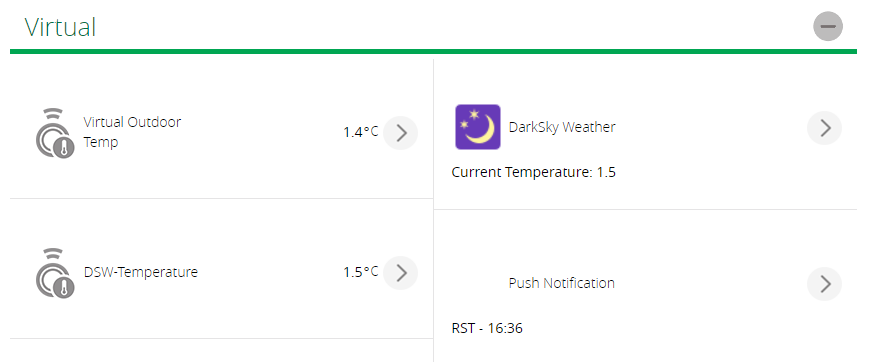
But the thermostats does not update to 1.4C, still 2.0C from the update time of the original plugin.

For digging into the TempSource 3, I manually created the URL from your code by inserting my API keys.

I checked the URL to get the information from my AmbientWeather device and the output seems to give the good results:

[{“macAddress”:“xx:xx:xx:xx:xx:xx”,“lastData”:{“dateutc”:1577569440000,“tempinf”:70.5,“humidityin”:32,“battout”:1,“temp1f”:36.3,“humidity1”:73,“batt1”:1,“feelsLike1”:36.3,“dewPoint1”:28.5,“feelsLikein”:68.8,“dewPointin”:39.2,“tz”:“America/New_York”,“date”:“2019-12-28T21:44:00.000Z”},“info”:{“name”:“My Weather Station”,“coords”:{“geo”:{“coordinates”:[-73.00000000000000,45.00000000000000],“type”:“Point”},“elevation”:17.00000000000000,“location”:“Cityname”,“address”:“civic streetname, Cityname, XX Zipcode, Country”,“coords”:{“lon”:-73.00000000000000,“lat”:45.00000000000000}}}}]

So the tempf1 is the variable to get (since my outside sensor is configured has the Sensor1. And converting 36.3F into Celsius give the exact temperature showed on my device (2.4C).

I did test it again by switching to TempSource 3 and reload luup. No change, reboot again Vera, and no change:
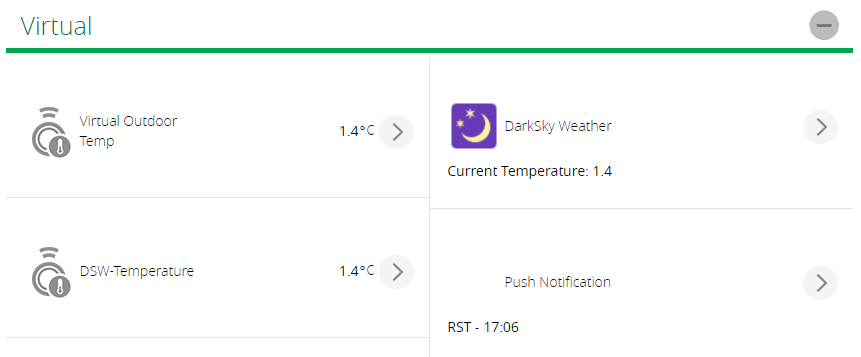
And thermostat still display 2.0C

From my tests, the EXT temp does not seems to update on the thermostats, source 2 or 3.
When source 3, the VOTS don’t get it and keep the previous temperature.

I notified from the URL parsing at the end you have “temp = data.lastData.tempf”, should it be “temp = data.lastData.temp1f”??? Has this is what I get from the URL output.

Also into the GetTemperature function, in the TempSource 1 part it set “tempFormat = data.tempFormat”, but it is never set “tempFormat” into the TempSource 2 & 3! Should it be set?

What you think?

Thanks again :wink:
Joel

Hi all, I am trying to use the Dark Sky plugin to know if it is snowing or not. Should I just use “Icon” ?problem is that when it has been snowing it says “Partly cloudy” Any ideas? just a simple “snow” is all I need.
Thanks

Hi @838joel,

Thanks for the API call results as that shows temp1f as the value to use and the API documentation did not mention it like that (it states tempf, no number).

For the thermostat not updating I found some weird code from the original like not handling negative numbers, so that is rewritten. As well as some other bits.

So attached is an updated version. L_VirtualOutdoorTemperature.zip (4.0 KB)

Cheers Rene

Hi @codemnausa,

Yes the icon variable is the one to use and the DarkSky API has the value ‘snow’. That should report snow if it is snowing, but one never knows with weather data. You can look at darksky.net for your location and see what that reports. It should match.

Cheers Rene

Hi @reneboer,

Perfect timing, I’m already into it trying to debug, but there is so much log to look at, I’m lost a bit! :wink:

I’ll give a try and let you know the results!

Joel

Quick question, will it display “-2.6” on the thermostat? Because I tried Temp Source 2, which shows “-2.6”, and on my thermostat still show “-3.0”.

I changed the update timing from 1200 (seconds) to 300 (seconds), so it update a little more frequently.
But still not changing after 5 minutes.

Okay now Vera shows “-4.0”, DarkSky shows “-2.5” as well VOTS. So it all goes to VOTS correctly for Temp Source 2.

Oh, just checked and my thermostat is showing “-2.5” Whohoo! :wink: I was a little to fast, and thinking that it might update only if the VOTS temp change, else it wont update the thermostat!

I will go ahead now to test Temp Source 3 ;). Will keep you posted!

Ok @reneboer,

It’s been over 20 minutes, and VOTS still show “-2.5” and my sensor show “-3.3” about.

So it does not seem to work with Temp Source 3!

@reneboer,

I look into the logs, I got the URL sent correctly with this line:

	log("VOTS::GetTemperature> Get temperature with URL: ".. url)

But I never get this information about the temperature it get with this line:

log("VOTS::GetTemperature> Got temperature: ".. temp)

Or any of the error before:

	if not data then
		log("VOTS::GetTemperature> Failed to decode weather response with error: "..(err or ""), 1)
		return false
	end
	data = data[1]
	if not data then
		log("VOTS::GetTemperature> Failed to decode weather response with error: no device found", 1)
		return false
	end

@reneboer,

I found this error about 500 lines after: seems to have trouble with the temp!:

01 12/30/19 11:41:41.819 ^[[31;1mLuaInterface::StartEngine failed run: 0 [string “-- $Revision: 18 $…”]:263: attempt to index local ‘temp’ (a number value)^[[0m <0x76a66520>

And this is line #263:

if temp:find(".") == nil then temp = temp .. ".0" end

Hi Joel,

Can you try to change line #263 to

temp = tostring(data.lastData.temp1f or data.lastData.tempf or 0)  -- May include sensor number it seems.

Cheers Rene

Got this error now:
^[[31;1mLuaInterface::StartEngine failed run: 0 [string “-- $Revision: 18 $…”]:263: attempt to index global ‘data’ (a nil value)^[[0m <0x769e4520>

Sorry, meant two lines up. The line looked similar except the tostring function.

Cheers Rene

Here is what I made, but not sure the precision it give… Was giving me -3.1 but was showing on thermostat -3.0

local function GetTemperature()
local temp, tempFormat = “0.0”, g_weatherSettings.tempFormat

-- Check for temp source
if g_weatherSettings.tempSource == SRC_MIOS then
	local url = string.format("http://weather.mios.com?tempFormat=%s&cityWeather=%s&countryWeather=%s",
		g_weatherSettings.tempFormat, UrlEncode(g_weatherSettings.weatherCity), UrlEncode(g_weatherSettings.weatherCountry))
	log("VOTS::GetTemperature> Get temperature with URL: ".. url)
	local status, content = luup.inet.wget(url, WGET_TIMEOUT)
	local data, pos, err = dkjson.decode(content)
	if not data then
		log("VOTS::GetTemperature> Failed to decode weather response with error: "..(err or ""), 1)
		return false
	end
	if data.errors then
		log("VOTS::GetTemperature> Invalid response from server: ".. content, 1)
		return false
	end
	temp = data.temp .. ".0"
	tempFormat = data.tempFormat
	if temp:find(".") == nil then temp = temp .. ".0" end
elseif g_weatherSettings.tempSource == SRC_DEV then
	temp = luup.variable_get(g_weatherSettings.tempVarSID, g_weatherSettings.tempVarName, g_weatherSettings.tempDeviceID) or "0.0"
	if temp:find(".") == nil then temp = temp .. ".0" end
elseif g_weatherSettings.tempSource == SRC_AMB then
	local url = string.format("https://api.ambientweather.net/v1/devices?applicationKey=%s&apiKey=%s",
		g_weatherSettings.applicationKey, g_weatherSettings.apiKey)
	log("VOTS::GetTemperature> Get temperature with URL: ".. url)
	local status, content = luup.inet.wget(url, WGET_TIMEOUT)
	local data, pos, err = dkjson.decode(content)
	if not data then
		log("VOTS::GetTemperature> Failed to decode weather response with error: "..(err or ""), 1)
		return false
	end
	data = data[1]
	if not data then
		log("VOTS::GetTemperature> Failed to decode weather response with error: no device found", 1)
		return false
	end
	temp = math.round(FtoC(data.lastData.temp1f), 0.1) or math.round(FtoC(data.lastData.tempf), 0.1) or "0.0"  -- May include sensor number it seems.
end
log("VOTS::GetTemperature> Got temperature: ".. temp)
return true, temp, tempFormat

end