The sonos plugin has support for ResponciveVoice so I use that for TTS on my SonoS speakers. Then I allso use VeraAlerts to send notifications to android devices where I use Vocalizer TTS to read me the events.
1 Like
Ahh, ok. It’s cloud-based. Then I stick with my own. Thanks for sharing!
I also use VeraAlerts to my iPhone via Growl, but without TTS.
Moreover, I also use the Sonos system but with a local Mac TTS server with a great natural voice. I think the problem is on the Vera side to send proper “åäö” characters to the server since it works proper on the servers home-page. Unfortunately this app is not available anymore but works fine as is.
I have v1.4 installed through Vera app store, but Forcast LowTemp and HighTemp are not in the child device list. I have no knowledge of code and would much appreciate your help if this is possible. I was using this to control a scene for a pool pump with WU, but have lost that abiliity.
I assume the pressure is in millibars. Netatmo uses in/Hg.
Hi @blindman75 , I can add these to the child device list for a next release.
Hi @wezley69,
It depends on the country you are in. Please look at the Wiki for more details. Home · reneboer/DarkSkyWeather Wiki · GitHub
Cheers Rene
Hello folks… I am new with the plugin, but I have a couple of years with Vera, my question today is, how the best way to display the collecion data from plugin on dashboard… or some app like homewave or imperihome… thanks in advance…
Hi @sweetpets ,
Both have problems showing plugins on their display. The only workaround I have is run it on openLuup and install the imperihome driver found here GitHub - reneboer/openLuup-ImperiHome: A simple LUA CGI file to make openLuup talk ImperiHome ISS
Cheers Rene
@reneboer - I am trying to get my weather announcement working but I am struggling in getting it to work with DarkSky. I have this running on my Veraplus.
My old lua code would say an announcent and then tell me the weather. How can i achieve this again?
url = require("socket.url")

local AV_DEV = 9
local LS_SID = "urn:micasaverde-com:serviceId:Sonos1"
local time = os.date('%I: %M')
local TEMP_SID ="urn:upnp-org:serviceId:TemperatureSensor1"
local WUGTempHigh = luup.variable_get(TEMP_SID, "CurrentTemperature", 15)
local currentCondition = luup.variable_get("urn:upnp-micasaverde-com:serviceId:Weather1", "Forecast.1.Condition", 12)


luup.call_action("urn:micasaverde-com:serviceId:Sonos1", "PlayURI", {URIToPlay="SQ:InfoChime.wav", Volume=50, Duration=20}, AV_DEV)
luup.call_action(LS_SID, "Say", {Text = string.format("Good morning, It is now %s. Today will be %s with a high of %s degrees", time,
currentCondition, WUGTempHigh) ,Volume=50}, AV_DEV)
Hi @notchy,
Can you try to change to “Forecast.1.Condition” to “TomorrowConditions”
And to be save you should avoid variables to be zero and the string.format to crash.
local WUGTempHigh = luup.variable_get(TEMP_SID, "CurrentTemperature", 15) or "unknown temperature"
local currentCondition = luup.variable_get("urn:upnp-micasaverde-com:serviceId:Weather1", "TomorrowCondition", 12) or "unknown condition"
Cheers Rene
I made those changes but the sonos speaker just starts playing the radio station I had played before in the morning.
Hi @notchy,
It sounds like something with your sonos setup and not with the DarkSky plugin. I saw you posted in that tread too so hopefully they can help you out.
How are you running the code? You can use the Test Luup Code panel and get quite results.
Cheers Rene
My sonos works fine. I was able to get the DarkSky weather announcement to work now.
The only issue I am having is expanding the announcement for tomorrow’s weather. The Lua test says it was successful but no audio announcement.
Here is my code that does not work with the annoucement.
Blockquote
url = require(“socket.url”)
local AV_DEV = 39
local LS_SID = “urn:micasaverde-com:serviceId:Sonos1”
local time = os.date(‘%I: %M’)
local TEMP_SID =“urn:upnp-micasaverde-com:serviceId:Weather1”
local OwTempTodayHigh= luup.variable_get(TEMP_SID, “TodayHighTemp”, 410)
local OwTempTodayLow= luup.variable_get(TEMP_SID, “TodayLowTemp”, 410)
local currentCondition= luup.variable_get(TEMP_SID, “TodayConditions”, 410)
local OwTempTomorrowHigh= luup.variable_get(TEMP_SID, “TomorrowHighTemp”, 410)
local OwTempTomorrowLow= luup.variable_get(TEMP_SID, “TomorrowLowTemp”, 410)
local tomorrowCondition = luup.variable_get(“urn:upnp-micasaverde-com:serviceId:Weather1”,
“TomorrowConditions”, 410)
luup.call_action(LS_SID, “Say”, {Text = string.format("Good morning, Family! Todays high will be %s degrees and the low will be %s degrees Tomorrow High is %s ", OwTempTodayHigh,OwTempTodayLow,OwTempTomorrowHigh) ,Volume=35}, AV_DEV)
Blockquote
This logic below works successfully with the announcement.
Blockquote
url = require(“socket.url”)
local AV_DEV = 39
local LS_SID = “urn:micasaverde-com:serviceId:Sonos1”
local time = os.date(‘%I: %M’)
local TEMP_SID =“urn:upnp-micasaverde-com:serviceId:Weather1”
local OwTempTodayHigh= luup.variable_get(TEMP_SID, “TodayHighTemp”, 410)
local OwTempTodayLow= luup.variable_get(TEMP_SID, “TodayLowTemp”, 410)
local currentCondition= luup.variable_get(TEMP_SID, “TodayConditions”, 410)
local OwTempTomorrowHigh= luup.variable_get(TEMP_SID, “TomorrowHighTemp”, 410)
local OwTempTomorrowLow= luup.variable_get(TEMP_SID, “TomorrowLowTemp”, 410)
local tomorrowCondition = luup.variable_get(“urn:upnp-micasaverde-com:serviceId:Weather1”,
“TomorrowConditions”, 410)
luup.call_action(LS_SID, “Say”, {Text = string.format("Good morning, Family! Todays high will be %s degrees and the low will be %s degrees ", OwTempTodayHigh,OwTempTodayLow) ,Volume=35}, AV_DEV)
Blockquote
Hi @notchy,
The LUA test saying things are successful does not mean all the code is right in my experience.
For all variables you pull I would advice to include the or … so a missing variable does not make the whole thing bum out. You can then find the problem one at the time. So
local OwTempTodayHigh= luup.variable_get(TEMP_SID, "TodayHighTemp", 410) or "no high temp"
Cheers Rene
It only seems the Today High Temp and Low Temp works.
It seems Darksky is not pulling in the Tomorrow Temp.
Is there something I am missing in my DarkSky setup?
Like the Device ID assigned to DarkSky Weather is Device ID # 410.
For the tomorrow weather High and Low temp is it device #410 or should it be one of the child devices ?
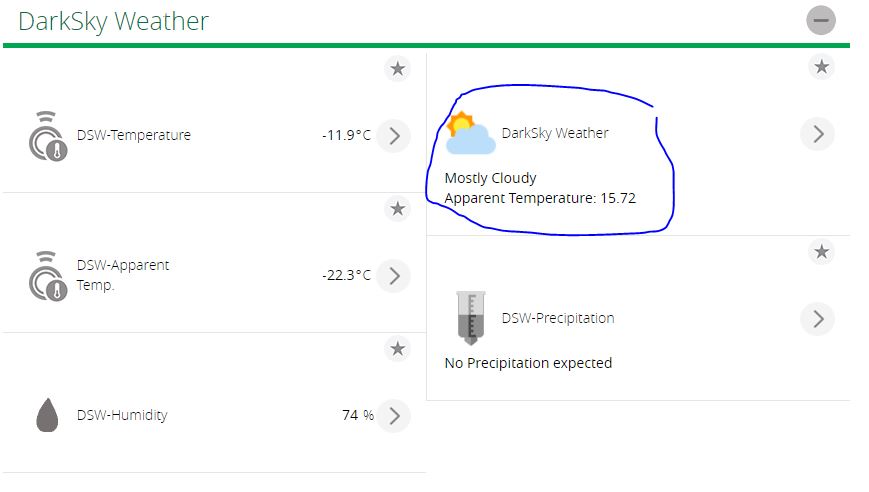
Hi @notchy,
Geese it’s cold where you are at 
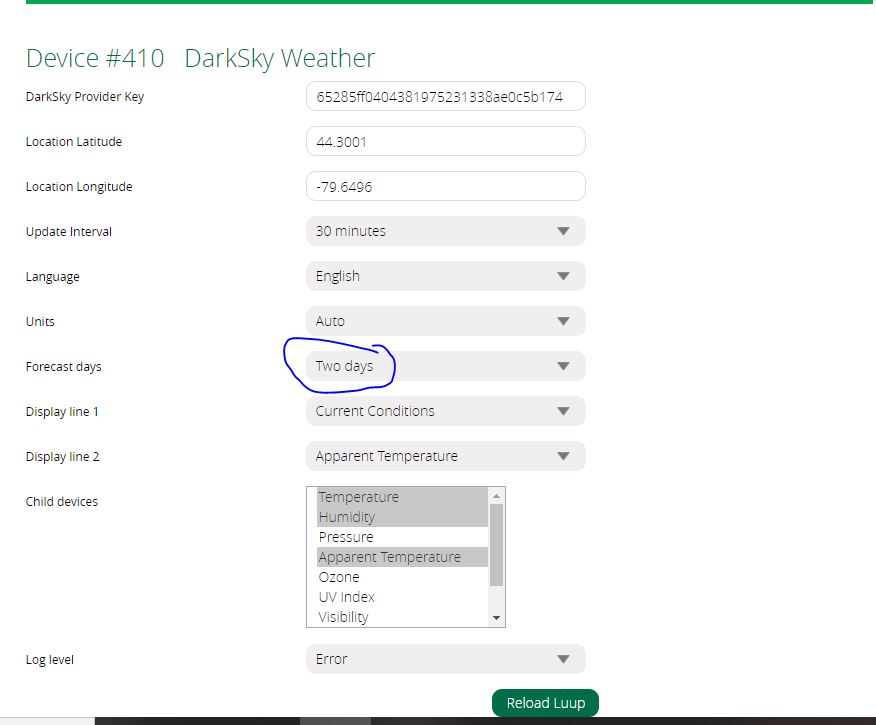
In the plugin settings, have you specified that at least the One Day forecast is to be included? It will not populate the Tomorrow values of you selected No forecast.
Cheers Rene
I have it set for 2 days, which should be enough to bring up the data.
Where can I view logs to see if the data is being pulled in for tomorrow’s temperatures?
Hi notchy,
You can look at the Advanced tab and the Variables. You the should see many Today…, Tomorrow…, anf Forecst.3… values with your settings.
Cheers Rene
Hi,
This plugin is amazing and I want to use it instead of the virtual Outdoor temp!
Here is my setup, I have many Stelpro STZW402+ Thermostat installed, and they use the “Virtual Outdoor Temp” (I guess I need that) to display it on the device. But that temp is not really accurate for my location, and I could not find a way to use my outside sensor reporting to AmbientWeather.
Anyhow, I find DarkSky pretty much accurate to what I have with my sensor and want to use this temp value instead of the one Vera report (which is 2C offset).
Is there a way to use DarkSky reporting temp used into the “Virtual Outdoor Temp” so I can have it displayed on my Thermostat?
Thanks for your help, and wish you all Merry Christmas!
Hi @838joel,
So if you have the Virtual Outdoor Temperature (VOTS) plugin installed your thermostat shows the outdoor temp? I had a look at it and there is some code to push the temp value to all installed zwave thermostats.
You could either change the VOTS to pull the outdoor temp from the darksky plugin, or ask me if (in the light of Christmas spirit) to add the function to this plugin 
Cheers Rene