A couple of weeks ago, the Ezlo/Alexa integration stopped working. It has happen before, and restarting the hub has usually fixed it, but not this time. Can you please check to make sure it is functioning?
Hello @Grwebster,
Thank you for contacting us.
We have sent you an email to help you troubleshoot your Ezlo–Alexa integration. Could you please check your inbox (including the spam/junk folder) and let us know if you received it?
Thanks in advance!
I joined the site. What do I do next. Enter a ticket?
Hello @Grwebster,
Sorry, which site? Did you receive the email?
Is the Alexa skill having issues again. Trying to reenable but it’s just sitting there checking credentials
1 Like
Same problem here. “Unable to link the skill at this time”
Yeah I’m seeing an expired message and need to reenable and when I do that it’s now getting past the login hanging and moving to a page that resembles the management of Alexa devices(Vera page) and when I click finish the it errors and says it’s unable at this time.
Hopefully on of the moderators sees this and can have it looked at.
Hello everyone,
We have identified an issue with our Amazon Alexa integration, and our dedicated team is currently working to resolve it as soon as possible. We appreciate your patience and understanding.
2 Likes
Same here, following thread…
Thank you. Any idea on how long until resolved?
Voice commands via Vera have been working again since yesterday. So it seems to be fixed here. Testing via Ezlo still needs to be done.
I am still not able to reenable the Vera skill. i get the Vera account logon screen and then it just sits there with no indication it’s doing anything after pressing the login button.I am using Alexa plus not sure if that’s a factor or not.
1 Like
Same here… Screen does not move forward to login. I am also using Alexa Plus.
1 Like
Any timeframe on a resolution?
Hello everyone,
Our team has applied a fix. Could you please check on your network using a CMD or terminal with the following command?
nslookup alexa.getvera.com
You should get a result similar to this:
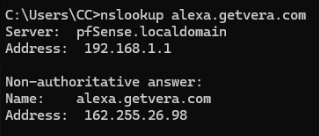
If you get a similar response, please try linking again using the Alexa app and our Vera skill.
I did not see this response initially and will do this when I can a bit later.
However I tried before I saw this and it appeared like it was going to work(showed me the devices in Alexa however they were unresponsive which isn’t new)but when I went back into the skill it showed the expired error and the Enable to Use button was active again so it did not work.
UPDATE
I just checked and it resolves to the IP address shown above. It still will not enable to skill.
It will enable and immediately disable the skill. I get the Alexa notifications and verify by going back into the skill and its not enabled.
1 Like
Thank you @Tim88,
We’ve escalated your results and comments to the department in charge, and they will continue investigating the issue and update you as soon as possible.
nslookup worked, re-enabling the skill does not.
what EXACTLY is the vera looking for so I can make sure the firewall isn’t blocking it.
Doesn’t seem like a name resolution problem at this point with the way it’s behaving. Seems more of something in the exchange is not working properly, I’m guessing it’s possible that Amazon changed something on their side and it has exposed an issue in the Vera skill.
Any updates on the status of this?