My pleasure. I have a couple of Shelly 1pm linked to 12v binary sensors. just use the virtual sensors to map them. It’s working very well.
1 Like
@therealdb I have now put the Shelly Plug on the dishwasher and run it with the plug connected and done som more testing.
There is still something wrong with the kWh value of the virtual device unfortunately. It gives a much higher kWh that the Shelly itself for one run of the dishwasher; approx. 57kWh instead of approx 0.9kWh.
I ran this test twice yesterday with unplugging the Shelly and resetting the kWh variable on the virtual device inbetween the tests, the result was the same each time.
I copied the new L_VirtualBinaryLight1.lua file once more just to make sure. MeterTotalUnit is set to 1.
What is even more strange is that the virtual device kWh continues to increase when the watts are 0 (plug still “on” but no load i.e. dishwasher turned off) as it did before the fix. This morning the kWh value is at approx 600 kWh and still increasing. Very strange indeed.
Doubble checking on MyShellyIP/status the meters[1].power Watt value stays at 0 and meters[1].total Wmin value does not increase when the load goes to 0.
I do not know why I did not detect this the last time I tested, perhaps it is due to the fact that the dishwasher gives 1.5-2kW at times and that this gives a much higher multiplication factor to the error over the approx. 2.5h it is running and also afterwards.
//ArcherS
yep, I noticed the same in my test environment.
It’s tricky, because it’s returning a value that’s not consistent. I’ll take a look at other implementations and try to fix it in the next days.
Unfortunately my order is still waiting to be dispatched since black friday 
1 Like
@therealdb let’s hope you get your findings soon. 
Nice to know that it is an oddity that you can see also.
I have also set up one of the Shelly Uni I bought. It works nicely, I created two virtual door sensors in Vera/OpenLuup that I trigger from the Button switched on url and Button switched off url on each Uni binary sensor channel.
A word of notice is that it does not connect to the two binary sensors (two relays in my case) in the same way as the old Fibaro Universal sensor. The Uni does it the ESP8266 way with a pull up resistor (R1). I used Fig 3A in the manual with “R1” at 10kOhms for my Uni powered with 12V DC.
The Uni supports connecting sensors; either up to three DS18B20 temperature sensors or one DHT22 temp/humidity sensor.
I connected one DS18B20 temperature sensor to my Uni.
To get the value into Vera/OpenLuup I created a virtual temperature sensor and a SiteSensor that gets the value from the Uni with response.ext_temperature["0"].tC.
The Shelly Uni seems as a potentially useful device combining two input/output and temp/humidity sensors. Maybe there is something that could be added to the plugin in the future, to make it easier to get it into Vera, the status response contains a few “new” fields.
//ArcherS
1 Like
As I’m using MQTT, I usually push them to virtual sensors using this route (so, I could easily push others things, like MiFloras, Tasmotas, etc). In fact, my weather sensors (wind, rain, temp and humidity) are based on two Shelly 1, and I’m waiting for the Uni to arrive to consolidate them into one single device (as I attempted with the Fibaro Smart Implant, but the support is suboptimal in Vera and I’ve probably received a faulty unit - I’ll wait for one of the eZlo hubs to support it in order to further test them, since I have two in my drawer). I’m using the same approach to push distance, soil moisture and many other generic sensor values.
All that said, I think I could easily add a virtual generic sensor that’s getting data from HTTP endpoints, but that’s what SiteSensor is already doing, so I’m not really motivated (because the features offered by SiteSensors are far superior to simply getting some JSON data).
It could be worth asking Shelly to add support to send tele over HTTP as well, in a comparable way they’re doing with MQTT. They’re usually very receptive.
I’ll write to them for guidance on our problem with Kwh as well, when I’ll be back near a computer next week.
1 Like
Agreed, it would be better if the Shelly could push the sensor data over http instead.
I have not yet set up MQTT, I will for sure test that when I get some time and motivation.
//ArcherS
Hello,
I just installed a Shelly plug on OpenLuup.
I can order it on / off without any problem.
But I can not go up the consumption Watts and KWH.
I activated the logs and I see an error:
openLuup.context_switch :: ERROR: [dev # 49] ./L_VirtualBinaryLight1.lua:494: attempt to perform arithmetic on local 'num' (a nil value)
2021-01-09 14:41:38.061   luup_log:49: VirtualBinaryLight[2.40@49](callback@235):httpGet.Async("http://192.168.1.149/meter/0", 1, 200, "{\"power\":549.63,\"overpower\":0.00,\"is_valid\":true,\"timestamp\":1610203298,\"counters\":[550.069, 549.984, 549.643],\"total\":101481}")
2021-01-09 14:41:38.061   luup_log:49: VirtualBinaryLight[2.40@49](callback@240):httpGet: onSuccess(200)
2021-01-09 14:41:38.062   luup_log:49: VirtualBinaryLight[2.40@49](onSuccess@514):updateMeters: "{\"power\":549.63,\"overpower\":0.00,\"is_valid\":true,\"timestamp\":1610203298,\"counters\":[550.069, 549.984, 549.643],\"total\":101481}"
2021-01-09 14:41:38.062   luup_log:49: VirtualBinaryLight[2.40@49](getValue@483):updateMeters.getValue("meters[0].total")
2021-01-09 14:41:38.062   luup_log:49: VirtualBinaryLight[2.40@49]:[updateMeters] KWH Path "meters[0].total" - Raw Value: nil - Transformed Value: nil
2021-01-09 14:41:38.062   openLuup.context_switch::  ERROR: [dev #49] ./L_VirtualBinaryLight1.lua:494: attempt to perform arithmetic on local 'num' (a nil value)
2021-01-09 14:41:38.062   luup.incoming_callback:: function: 0x14cda18 ERROR: ./L_VirtualBinaryLight1.lua:494: attempt to perform arithmetic on local 'num' (a nil value)
Arrays are 1 based in lua - crazy, I know. So it should be [1] and not [0]. Change your vars accordingly.
EDIT: but in your case just power or total is enough.
I changed to
meters [1] .power
but I do not go back anything
see log always an error
2021-01-09 16:49:21.533   luup_log:49: VirtualBinaryLight[2.40@49](@510):updateMeters("http://192.168.1.149/meter/0")
2021-01-09 16:49:21.533   luup_log:49: VirtualBinaryLight[2.40@49](httpGet@184):httpGet("async")
2021-01-09 16:49:21.542   luup_log:49: VirtualBinaryLight[2.40@49]:updateMeters: next call in 60 secs
2021-01-09 16:49:21.786   luup_log:49: VirtualBinaryLight[2.40@49](callback@235):httpGet.Async("http://192.168.1.149/meter/0", 1, 200, "{\"power\":555.65,\"overpower\":0.00,\"is_valid\":true,\"timestamp\":1610210962,\"counters\":[470.876, 0.000, 0.000],\"total\":128936}")
2021-01-09 16:49:21.786   luup_log:49: VirtualBinaryLight[2.40@49](callback@240):httpGet: onSuccess(200)
2021-01-09 16:49:21.786   luup_log:49: VirtualBinaryLight[2.40@49](onSuccess@514):updateMeters: "{\"power\":555.65,\"overpower\":0.00,\"is_valid\":true,\"timestamp\":1610210962,\"counters\":[470.876, 0.000, 0.000],\"total\":128936}"
2021-01-09 16:49:21.787   luup_log:49: VirtualBinaryLight[2.40@49](getValue@483):updateMeters.getValue("meters[1].total")
2021-01-09 16:49:21.787   luup_log:49: VirtualBinaryLight[2.40@49]:[updateMeters] KWH Path "meters[1].total" - Raw Value: nil - Transformed Value: nil
2021-01-09 16:49:21.787   openLuup.context_switch::  ERROR: [dev #49] ./L_VirtualBinaryLight1.lua:494: attempt to perform arithmetic on local 'num' (a nil value)
2021-01-09 16:49:21.787   luup.incoming_callback:: function: 0x2a12cf0 ERROR: ./L_VirtualBinaryLight1.lua:494: attempt to perform arithmetic on local 'num' (a nil value)
As I said, if you’re calling /meters/0 endpoint, you’ll get a single value, not an array. so, just use power or total, instead ofmeters[1].power or meters[1].total.
Thank you for your patience.
I understood we can only have power or total
I changed my setting while keeping power, but I still have a problem because meters [1] .power returns a nil value, although the value of power is returned
2021-01-09 19:00:34.070   luup_log:49: VirtualBinaryLight[2.40@49](@510):updateMeters("http://192.168.1.149/meter/0")
2021-01-09 19:00:34.071   luup_log:49: VirtualBinaryLight[2.40@49](httpGet@184):httpGet("async")
2021-01-09 19:00:34.077   luup_log:49: VirtualBinaryLight[2.40@49]:updateMeters: next call in 60 secs
2021-01-09 19:00:34.319   luup_log:49: VirtualBinaryLight[2.40@49](callback@235):httpGet.Async("http://192.168.1.149/meter/0", 1, 200, "{\"power\":549.46,\"overpower\":0.00,\"is_valid\":true,\"timestamp\":1610218834,\"counters\":[551.379, 550.881, 551.363],\"total\":153158}")
2021-01-09 19:00:34.320   luup_log:49: VirtualBinaryLight[2.40@49](callback@240):httpGet: onSuccess(200)
2021-01-09 19:00:34.320   luup_log:49: VirtualBinaryLight[2.40@49](onSuccess@514):updateMeters: "{\"power\":549.46,\"overpower\":0.00,\"is_valid\":true,\"timestamp\":1610218834,\"counters\":[551.379, 550.881, 551.363],\"total\":153158}"
2021-01-09 19:00:34.320   luup_log:49: VirtualBinaryLight[2.40@49](getValue@483):updateMeters.getValue("meters[1].power")
2021-01-09 19:00:34.321   luup_log:49: VirtualBinaryLight[2.40@49]:[updateMeters] Watts Path: "meters[1].power" - Value: nil
2021-01-09 19:00:34.321   luup_log:49: VirtualBinaryLight[2.40@49](setVar@114):setVar("urn:micasaverde-com:serviceId:EnergyMetering1","Watts","",49) old value ""
Ok I understand …
it works well
Thank you
1 Like
Hello all and thanks to therealdb for creating this useful plugin!
I’m reporting my success adding the Shelly DUO US Bulb (CCT) which I haven’t found reference to this model in this thread.
I received (4) of these and added 2 of them to my network using the Shelly Cloud app (Android) with ease.
Although these are not RGBW devices (only tunable white), based on Daniel’s github readme, I chose . . .
On openLuup (RPi3) I created a new device as:
D_VirtualRGBW1.xml
I_VirtualRGBW1.xml
D_DimmableRGBLight1.json (auto created)
After some trial & error to find the correct on, off, dim, white urls, the following work great
http://192.168.1.46/light/0?turn=on
http://192.168.1.46/light/0?turn=off
http://192.168.1.46/light/0?brightness=%s
http://192.168.1.46/light/0?&temp=%s
My question is:
Should I leave the SupportedColors variable alone as the bulb is functioning as designed?
Should I leave the TargetColor variable alone? The values on the screenshot below may have been when I was experimenting with the “Bulb Color” control tab settings.
Although the “Bulb Color” CCT settings do not work for me, it is not important, I usually don’t use that interface.

Other variables set fyi (not shown)
MinTemperature set to 2700
MaxTemperature set to 6500
CurrentColor: 0=0,1=0,2=255,3=255,4=255
In case it helps anyone, Shelly status reported:
{"wifi_sta":{"connected":true,"ssid":"XXXXXXXXX","ip":"192.168.1.46","rssi":-33},"cloud":{"enabled":true,"connected":true},"mqtt":{"connected":false},"time":"08:13","unixtime":1610871199,"serial":86,"has_update":false,"mac":"XXXXXXXXXXX","cfg_changed_cnt":1,"actions_stats":{"skipped":0},"lights":[{"ison":true,"source":"http","has_timer":false,"timer_started":0,"timer_duration":0,"timer_remaining":0,"brightness":100,"white":100,"temp":6500}],"meters":[{"power":9.00,"is_valid":true,"timestamp":1610871199,"counters":[9.000, 9.000, 9.000],"total":444}],"update":{"status":"idle","has_update":false,"new_version":"20201124-090917/v1.9.0@57ac4ad8","old_version":"20201124-090917/v1.9.0@57ac4ad8"},"ram_total":51168,"ram_free":38500,"fs_size":233681,"fs_free":159385,"uptime":4228}
Again, thanks for the great plugin!
Regards,
ChrisTheC
Glad you’re liking it.
No need to change variables if you’re ok. If colors are not supported, UI will still show color picker but command will not be sent. Just use skip as command and you should be good. Color temp should already be ok.
1 Like
I have installed this plugin from my hub under apps/install apps. I entered the IP address if my tasmota sonoff basic but it does not switch on or off the device. I set the toggle URL in the variables tab but nothing. What else do I need to do to get it to work.
Many thanks
The url are enough. Post your variables, so I could double check them.
I’m just at work so will grab some screen shots as soon as I can.
I installed the app via the Vera unit. Are there any other files I need to upload, or is the app all I need?
Many thanks
App is enough. I usually update it on GitHub first, but the latest version should be on AppStore as well. It’s very easy to setup, so it’s strange you’re having troubles, but we’ll take a look at the vars and fix it 

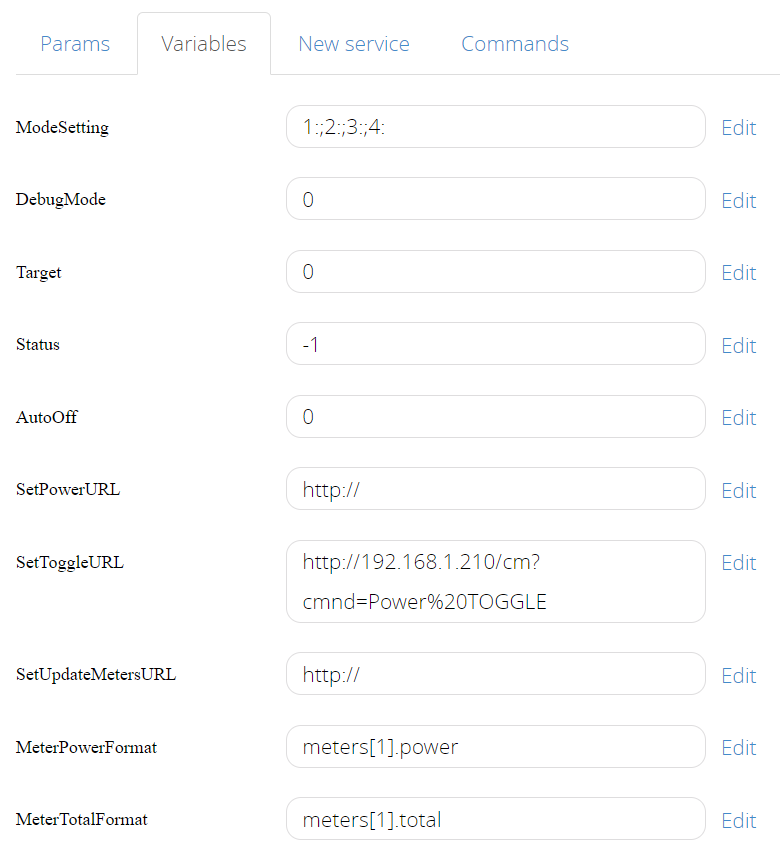
you just need to set altro SetPowerUrl and SetPowerOffUrl, as you did for SetToggleUrl.