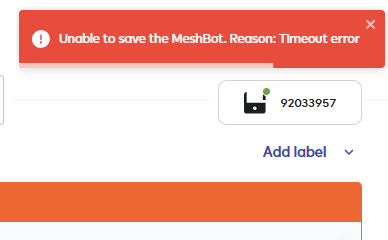
Just created a new Meshbot rule on the Ezlo Secure Controller it seems when I add a Label to the rule and try and Save I get a time out error and I cannot save the rule. But without the label added the rule saved fine OK.
Actually maybe its not related to having a label present or not. I just tried to edit the existing rule to change my HTTP command slight and tried to Save and its timed out again.
Unfortunately, I can’t replicate this. I created a new Meshbot and a new label. Then I saved everything, and there were no error messages.
Then I tested whether I could edit and save existing Meshbots. First, I tried a cloud Meshbot. That worked. However, at some point, I did get a timeout error message before I successfully tried editing a local Meshbot. After that, the error message didn’t reappear, even though I repeated the previous steps.
I was just able to reproduce the error message. I edited an inactive Meshbot (changed the title). With this Meshbot, I’m asked if I really want to save the change. Oddly enough, this question doesn’t appear with the other two Meshbots I also tried. However, saving fails with these because an expression doesn’t exist (I must have deleted it at some point). A short time later, the error message appears stating that it can’t save the Meshbot due to a timeout. Perhaps you’re experiencing something similar.
Best Home Automation shopping experience. Shop at Ezlo!