[quote=“zedrally, post:80, topic:199682”]Not sure if this request is in the right thread but so far I haven’t seen anyone request an Advanced or Experts UI.
Features of the Experts UI could include (but not limited to):
[ul][li][size=1em]Plug In control (Addition and Deletion)[/size][/li]
[li][size=1em]Secure & non-secure Inclusion[/size][/li]
[li][size=1em]Reset & Factory Reset (Z-Wave Newtwork Date)[/size][/li]
[li][size=1em]Scan Devices[/size][/li]
[li][size=1em]Test Nodes[/size][/li]
[li][size=1em]Optimize Network[/size][/li]
[li][size=1em]Controller management (Setting Primary and Slave)[/size][/li]
[li][size=1em]Back Up[/size][/li]
[li][size=1em]Restore[/size][/li]
[li][size=1em]Restart and Erase[/size][/li][/ul]
I’m sure there are many other features that users would like to see, HS provides excellent Tools, anything approaching their Tools would be beneficial.[/quote]
This is very good proposal. Basic/Advanced UX is part of our thinking as well. Well noted and added to the list of items to define as requirement.
sometimes when a device doesn’t work as expected it is very helpfull to see the what’s sent over the “air” filtered by a specific device.
The current solution to connect via putty and examine the logfile to see the comunication is more than unhandy.
All the “Happy Path” stuff works pretty well, except for some inconsistent support for the browser back button and some slow loading. I presume a framework modernization will fix these.
Since I use the UI primarily for setup and config, I’d like to see more effort in these places.
Lets see some mockups of a new UI for editing device settings and advanced configuration. THAT would get me excited.
Make the “Test Luup code (Lua)” UI really easy to use, with an embedded Lua code editor and the ability to see and filter log feedback live without refreshing the page or having to leave the UI to test minor things.
Make it possible to view review errors in Luup code attached to scenes entirely in the UI.
How about built in charts and history like temperature history for temperature sensors, energy usage for supported devices but inline with the device and not using the sadness that is the current energy tab and without having to install a bunch of stuff. (This is your value add to sell subscriptions: 24 hours free, more for $)
An app store that doesn’t make you dread using it.
[quote=“dJOS, post:2, topic:199682”]It looks nice but you need to make the platform stable andfast, in that order, first!
Other than being excruciatingly slow, the current UI is mostly ok - my main gripe is it’s slow to update (needing to force page refreshes is just poor form) and poor UI organisation, eg reboot the device in the WiFi settings … seriously! facepalm[/quote]
I would love a UI that lets me quickly move between rooms. Imperihome has this, but with vera UI (mobil and desktop), you are stuck scrolling down to the room you are looking for.
This UI looks pretty nice to me, graphically. But I really hope focus is not on graphics alone! UX is where the focus should be. Are you doing any user tests, where you just sit next to a real user and see how he/she is using the interface? I?m sure you?d be surprised about what you see.
My own wishes for improvement lie not in the UI, but purely in the UX. For example and in random order:
Many things require more clicks than necessary
Constant luup-refreshes
Functionality hidden away (understandable), but with no option to search for them
Loading speed (performance)
Annoying redirect to cloud login page AND logged in user is not remembered
After logging in I?m relayed and thing load even slower (and image don?t show at all)
Going back to local, I?m logged out again
Hideously complex screens, not ordered logically and without explanation (eg scene edit)
Dashboard is not usable as a dashboard (sorry)
Linux time instead of human time
Lack of debugging / knowing what is going on without reverting to dev-level log reading
Test Luup code has no feedback (compare AltUI)
Limit of 20 characters on names resulting in terrible abbreviations like ?Thermos Master Bedro?
The need to press CTRL+F5
No history of events for devices (eg z-wave polls)
Redirect to firmware upgrade
Rooms that are sometimes shown in alphabetical order
An Energy/Ergy tab that was promoted to 1st level for some reason
Not being able to clear a variable (to null) after it has a value
Not being able to remove a variable after it is created
No clear z-wave management screen, only many buttons spread through the UI with functionality you?ll have to guess.
UI looks promising , I currently use 3rd party apps that enable me customize the layout how I want it
As both an andriod and ios user, the experience is not that same on both devices , I literally have buttons that work on ios but not on andriod
Presence detection on first screen shot, is that geo-fencing or wifi or both?
Everyone complains about stability , my vera has been pretty stable , except for that one time when it crashed during an upgrade.
The ability to build a custom UI, consistent across all devices that I can also slap on a tablet to put on a wall will be great!
The mobile app UI is much more important than the web UI as the mobile UI is the one we use daily on our Android phones and tablets to control Vera.
The Vera web UI does also need improving, but I only use it for setup and configuration, my family have never seen the web UI or your own Vera mobile app.
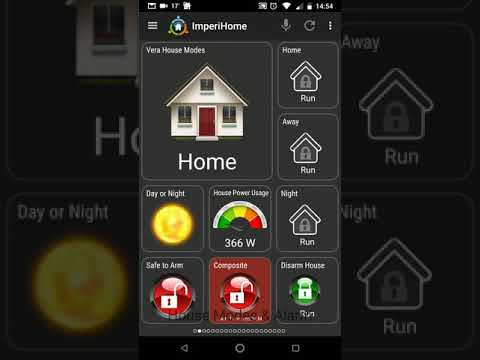
Your new mobile UI needs to be like the excellent Imperihome app and better !
Here is a Youtube video of Imperihome on my mobile phone, ignore the TV sound in the background :-[
Custom dashboard pages and layouts where you can add devices, scenes and sensors, reorder them in to any position you want. Change the order of the dashboard pages (numbered) left to right scrolling etc we can decide which dashboard pages are in what order. Choosing the first dashboard page that is displayed anytime the app is launched is also an option.
Custom icons we need to be able to use our own icons for devices, scenes and sensors. Also different icons for device states, on / off etc.
Composite devices, in Imperihome you can add multiple security sensors in to one composite device to view all of them at a glance in a popup menu. Same with lights you can add multiple lights in to one single composite device to control all of them via that one device within the app, see the video URL above and my two lounge lamps and the two RGBW strips both controlled by one composite device in Imperihome. Another example would be a composite device that can control multiple Window Coverings, so one device in the app could open / close several curtains / blinds.
Harmony Hub integration as you can see in the video, Imperihome natively supports adding Harmony Activities.
Also I used Vera ALTUI Custom pages to build remote control pages for my TV and Kodi. Would be nice if we could natively add IR device buttons from a Harmony hub in to the Vera mobile app to build up remote controls pages within your app.
To be able to embed webpages in to the dashboard pages of the mobile app, for example so you can embed a web based Weather widget into a dashboard page. This is also how I got the Vera ALTUI custom remote control pages in to the Imperihome app.
To be able to add widgets / buttons to the dashboard pages that do other things like send a http call command, I used these to add custom buttons for TV channel favourites or to control my AVR amps Audio modes and volume. In Imperihome you can add a button with a http command behind it, there are options for a local http command a remote http command Login and Password (optional) Method Get or Post etc. This feature is very useful to control any IP based device that supports it by sending a http / json command to it, good for when Vera doesn’t support a particular device of that type but allows your users to add buttons for it into your mobile app!
Widgets on the Android desktop, to either launch the Vera mobile app directly to a certain page, or widgets to run scenes etc right from the Android desktop.
Import / export of mobile app design and layout settings etc from one mobile device to another this is a must have.
To be able to lock certain actions with a pin code, for example so you cannot simply turn Vera in to Home mode or run a Disarm scene without first entering a pin code.
To be able to add a button on to a dashboard page that when pressed takes you to another dashboard page like a link or shortcut, this way we can create a default starting dashboard page and have icons that take you to other dashboard pages / areas of the app, for example a Lights icon takes me to a dashboard page with all my lights. A Security Sensors icon takes me to a dashboard page showing all my security sensors etc.
To be able to add a button to launch another application on the mobile device, I use this to launch Spotify and Google Play music from within a dashboard page in Imperihome.
Support in the Vera mobile app for 3rd party plugins, Imperihome does support some of the main 3rd party plugins for Vera, I don’t have a complete list but one example would be the Multi Switch plugin which is a virtual switch plugin for Vera, these are accessible in the Imperihome app but I believe that they are not in your own current Vera mobile app.
Setting to lock down configuration actions so other family members cannot change the configuration of the app.
API HTTP Server within the mobile app, in Imperihome you can turn on this and we can then send HTTP commands from the Vera controller to the mobile app to do things. This is very useful for wall mounted control tablets, for example when you press my doorbell the doorbell scene that runs in Vera also sends a HTTP command to Imperihome on my wall mounted tablet to bring up the outdoor camera image. Other things if can do are make the app navigate to a particular dashboard page. Or send a TTS (Text to speech) announcement from a scene run on Vera to the Imperihome tablet so it says something like “There is someone at the door” More details here: http://dev.evertygo.com/api/local
Also for wall mounted tablets, options to wake up the tablet device via the camera when it detects movement in front of it, then showing the Vera mobile app etc, also an option to automatically launch the Vera mobile app after the device has been rebooted.
In Imperihome app there is the main dashboard view which is what we use and there is also a flat list view as you will see in the video, no one in my family uses the flat list view as I have it locked down, but in the flat list view I can see and control all the Vera scenes and devices that are not present on the main dashboard pages etc.
Imperihome can do all that I have listed above and much more, may I highly recommend you have your development team take a very close look at the Imperihome app and its features and functions, if you bring out a new Vera mobile app that is even better than Imperihome you and your team will be Rock stars !
Thank you so much for putting your time on the table and providing tons of feedback. Your advocacy and persistence mean the world to us, and it is a true pleasure to fill in the backlogs of our PM’s with all this amazing and detailed feedback.
An important part of UI8 will, of course, be the mobile app and we’re thirsty for every bit of mobile-related data we can get.
As Melih mentioned numerous times. Stability is a given and huge amount of R&D dept. is doing just that, as I speak.
Stability is a big item for me. I generally just use a few scenes to control lights as it detects other items, like lights on when garage opens etc… Now with the Skaro homebridge, we use our iphone ios Home app to manually turn items on and off, and the homePod in our kitchen means we dont even have to pickup a device.
i think native addition of something like Weather Underground, virtual switches and being able to use those in scenes are some additions i’d like… after sorting stability and speed of the system.
What about thermostat modes?
Modern thermostats have a lot of modes, for example - Comfort, Eco, Vacation, Dry, Timer, etc. - it only for heating thermostats!
Air conditioners - have modes too.
But Vera in UI7 can handle only fancoils, or other rusty devices from XIX century
And what about S2 security? It coming, or time to select secure device, instead of Vera?
Interface looks good. On my wishlist is the ability to create more advanced scenes (like the one on Homey) and the incorporation of IFTTT, IKEA Tr?dfri integration, fix issue with Netatmo weather station, the ability to include cameras from Netatmo and Arlo. And finaly; Google Home support.
First off, THANK YOU for easking for the community’s input. i was considering switching to smartthings because Vera wasn’t integrating to Google home and development seemed to have stopped. I’m going to stick around a while longer and see what happens next.
My two main beefs with the mobile app are these 2 listed by cw-kid:
[quote=“cw-kid, post:91, topic:199682”]7. Widgets on the Android desktop, to either launch the Vera mobile app directly to a certain page, or widgets to run scenes etc right from the Android desktop.
and
Setting to lock down configuration actions so other family members cannot change the configuration of the app.[/quote]
There is a (now defunct) app call AuthomationHD which allowed me to have a widgets on the android dashboard and I used it to run frequently used scenes. I miss that tremendously and it’s such a huge andvantage of Android over IOS.
My only wish would be just a more stable, easier and better bridge mode integration between 2 veras. Its really dificult to implement a large home install using only one vera. And bridging vera is really a challenge at this moment
First of all new graphic - the one presented is good but not fascinating.
Next: speed - if I give a control panel to my guest he won’t be happy to wait for light to come up or color to change. When testing speed of working, please compare it to the standard instalation without all that electronics. The closer you get with timings, the better.
And the last thing: Per user customizable dashbord with option to switch off all other tabs, so when I give a tablet to my kid or wife or whatever, let them see only things that they need to see.

 On my wishlist is the ability to create more advanced scenes (like the one on Homey) and the incorporation of IFTTT, IKEA Tr?dfri integration, fix issue with Netatmo weather station, the ability to include cameras from Netatmo and Arlo. And finaly; Google Home support.